How to use break, pass and continue in Python?
Introduction
Loops help you iterate over a list, tuple, dictionary, set, or string. The code inside a loop is executed multiple times until the condition fails. But sometimes, you wish to exit the loop or skip an iteration or ignore the condition. These can be achieved by the use of loop control statements.
In this tutorial, we will learn about the three loop control statements in Python with examples - break, continue and pass.
Python break Statement
The break statement is used to terminate the loop in which it is used. In the case of nested loops, it will terminate the current loop in which it is used.
The flow chart for the break statement is as follows:
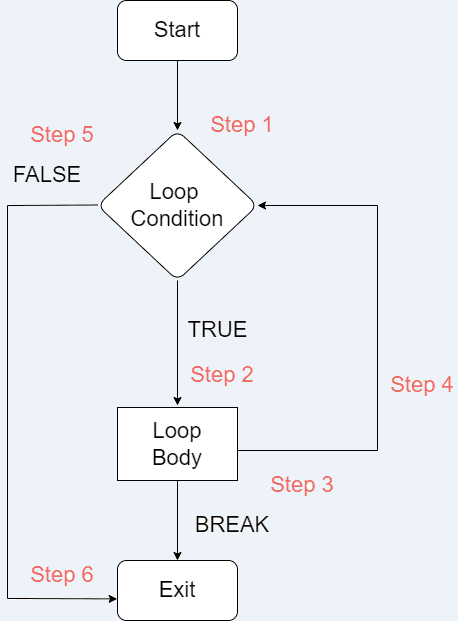
The execution is as follows:
Step 1: The loop starts
Step 2: If the condition is true, the loop body is executed.
Step 3: If the loop body contains break statement, the control exits out of the loop and goes to Step 6.
Step 4: After the body is executed, it goes to the next iteration in Step 4.
Step 5: If the condition is false, the control exits the loop and goes to Step 6.
Step 6: The loop terminates.
Let us now look at a few examples of break statements:
Example 1
nums = [1, 3, 5, 16, -7, 9, 7]

for num in nums:
    if num < 0:
        print("I found a break statement! Bye Bye...")
        break
        print("Would I be printed?")
    print(num)
print("Outside loop!")
Can you guess the output of the above code?
1
3
5
16
I found a break statement! Bye Bye...
Outside loop!
I hope you guessed it right! The loop executes normally till 16. As soon as it finds a number less than 0, i.e. -7, it enters the if condition. Inside the if condition, first it prints the message and then finds a break statement. Due to the break statement, it exits out of the loop, and the second print statement inside the if condition is not printed. It then finally prints the last print statement.
Example 2
nums = [1, 3, 5, 16, -7, 9, 7]

i = 0
while i < len(nums):
    if nums[i] < 0:
        print("I found a break statement! Bye Bye...")
        break
        print("Would I be printed?")
    print(nums[i])
    i += 1
print("Outside loop!")
Can you guess the output this time?
1
3
5
16
I found a break statement! Bye Bye...
Outside loop!
Well, the output remains the same this time too. It's so because we have just replaced for loop with while loop.
Example 3
for i in range(4):
    for j in range(4):
        if j == 2:
            break
        print(i, j)
Can you guess the output in the above nested-loop code?
0 0
0 1
1 0
1 1
2 0
2 1
3 0
3 1
The above code snippet uses nested for-loops. Both the loops are iterating from 0 to 4. In the second for-loop, there is a condition, wherein if the value of the second for-loop index is 2, it should break. So because of the break statement, the second for-loop will skip iteration for 2 and 3.
Python continue Statement
Using the continue statement, you can skip the code after it and the control goes back to the start of the next iteration.
The flow chart for the break statement is as follows:
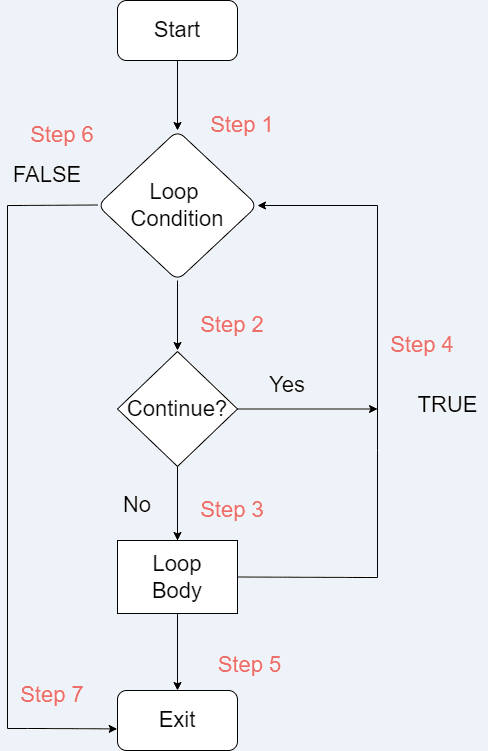
The execution is as follows:
Step 1: The loop starts
Step 2: If the condition is true, the control enters the loop. If there is a continue statement, it goes to Step 4 and starts the next iteration.
Step 3: The loop body is executed.
Step 4: If there is a continue statement or the loop execution inside the body is done, it will go for the next iteration.
Step 5: If the loop execution is complete, the control exits the loop and goes to Step 7.
Step 6: If the loop condition is false, the control exits the loop and goes to Step 7.
Step 7: The loop terminates.
Let us now look at a few examples of continue statements:
Example 1
nums = [1, 3, 5, 16, -7, 9, 7]

for num in nums:
    if num < 0:
        print("I found a continue statement!")
        continue
        print("I would be skipped!")
    print(num)
In the above code, as soon as the control reaches -7, it enters the if condition where it first prints the print statement. Then it finds the continue statement which tells it to skip the code below it and move to the next iteration. Hence -7 will never be printed.
1
3
5
16
I found a continue statement!
9
7
Example 2
nums = [1, 3, 5, 16, -7, 9, 7]

i = 0
while i < len(nums):
    if nums[i] < 0:
        print("I found a continue statement!")
        i += 1
        continue
        print("I would be skipped!")
    print(nums[i])
    i += 1
The output for the above snippet would remain the same. Notice the two i += 1 statements. The second one is the usual one. The first one, inside the if condition, helps us avoid an infinite loop.
1
3
5
16
I found a continue statement!
9
7
Example 3
for i in range(4):
    for j in range(4):
        if j == 2:
            continue
        print(i, j)
The above code snippet uses nested for-loops. Both the loops are iterating from 0 to 4. In the second for-loop, there is a condition, wherein if the value of the second for-loop index is 2, it should continue. So because of the continue statement, the second for-loop will skip iteration for 2 and go for 3.
0 0
0 1
0 3
1 0
1 1
1 3
2 0
2 1
2 3
3 0
3 1
3 3
Python pass Statement
This statement is used as a placeholder within Python loops, functions, classes, or conditions to tell the user that this will be implemented later. It is a null statement and the interpreter ignores it whenever it is encountered.
Let us see examples of pass statement:
Example 1: Function
def my_func():
    print("Hello World")
    pass

my_func()
Output:
Hello World
The pass statement will be executed whenever the function my_func is called. However, in this case, it is not required to add pass statement.
Example 2: Class
class MyClass:
    pass
If you need to create a class and you're going to implement it later, you can simply add a pass statement to avoid the IndentationError.
Example 3: Loop
nums = [1, 3, 5, 16, -7, 9, 7]

for num in nums:
    if num < 0:
        print("I found a pass statement!")
        pass
    print(num)
In the above snippet, the pass statement does nothing at all.
1
3
5
16
I found a pass statement!
-7
9
7
Example 4: If Condition
num =3

if num == 3:
    print("Before pass")
    pass
    print("After pass")
What do you expect in this case? Do you think "After pass" will be printed?
Before pass
After pass
Of course, it will be! The pass statement doesn't do anything at all.
When to choose break and continue?
Whenever you want to terminate the loop completely, you should choose the break statement. However, if you wish to skip the current iteration of the loop and proceed to the next one, choosing the continue statement would make sense.
Conclusion
In this tutorial, we covered most of the things around break, continue and pass statements in Python. We also saw various examples to have a clear understanding of how they actually work. In the end, we also learned when to choose break and continue statements.
I hope you found the tutorial helpful. Share it with your Python buddies!
About the author
- Software Engineer at OpenText passionate about building scalable web applications and backend systems. I work mainly with Java, Spring Boot, Python, and modern web technologies. I enjoy creating things for the internet, exploring new tech, and sharing what I learn along the way.
Comments
Join the discussionNo comments yet. Be the first to comment.